OnePlus Ace 6 Boardview & Schematics Update for PCB Repair
OnePlus Ace 6 schematics and boardview updated with Partname, Netname and IN & OUT voltage information. Complete PCB repair resource for mobile technicians.
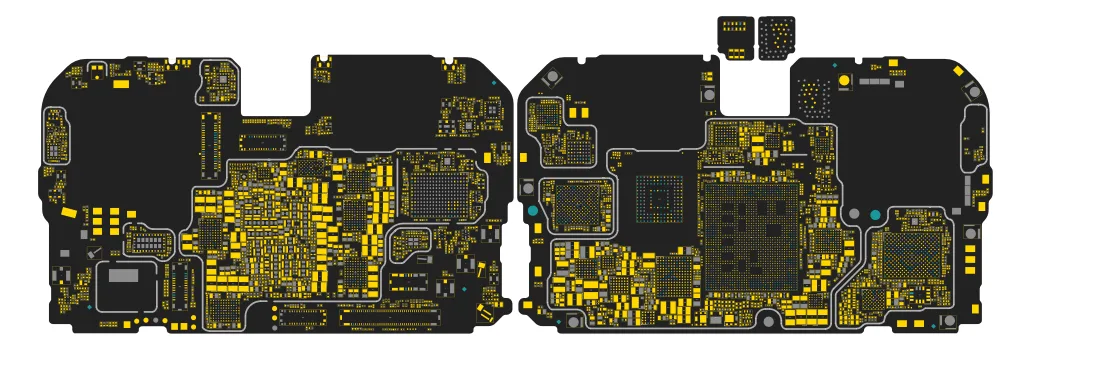
OnePlus Ace 6 Schematics & Boardview Update – PCB Layout, Motherboard Diagram and Voltage Lines
The OnePlus Ace 6 Schematics and OnePlus Ace 6 Boardview files have been updated to provide more detailed circuit information for mobile repair technicians. Using the OnePlus Ace 6 PCB Layout and OnePlus Ace 6 Motherboard Diagram, technicians can easily trace circuit paths, identify components, and diagnose motherboard faults.
This update adds Partname, Netname, and Power IN & OUT Voltage information to the OnePlus Ace 6 schematics file, allowing technicians to perform faster and more accurate smartphone PCB repair and troubleshooting.
For technicians working on OnePlus smartphone motherboard repairs, these files provide an essential reference for analyzing power rails, signal paths, and component placement on the motherboard.
OnePlus Ace 6 Schematics File
The OnePlus Ace 6 schematics file provides a detailed electronic circuit diagram of the smartphone motherboard. It shows how components such as processors, power ICs, resistors, capacitors, coils, and connectors are interconnected.
Using the OnePlus Ace 6 schematic diagram, technicians can:
Trace power supply rails and voltage lines
Identify faulty or missing motherboard components
Diagnose short circuits on the PCB
Analyze signal communication between ICs
Perform advanced OnePlus Ace 6 motherboard repair
The OnePlus Ace 6 motherboard diagram helps technicians understand the complete circuit architecture of the device.
OnePlus Ace 6 Boardview File
The OnePlus Ace 6 boardview file provides a visual PCB layout of the OnePlus Ace 6 motherboard. It shows the exact location of every component on the PCB.
Using the OnePlus Ace 6 PCB layout, technicians can:
Quickly identify IC locations
Locate damaged or missing components
Trace signal paths across the motherboard
Cross-reference with the OnePlus Ace 6 schematics
The OnePlus Ace 6 boardview is an essential tool for Android phone motherboard repair and PCB troubleshooting.
Partname & Netname Information Added
The updated OnePlus Ace 6 schematics and boardview files now include Partname and Netname information for motherboard components and circuits.
With this information technicians can:
Identify motherboard components quickly
Follow circuit connections across the PCB
Analyze signal routing between components
Perform more accurate OnePlus Ace 6 motherboard diagnostics
This improvement makes OnePlus smartphone PCB troubleshooting much easier.
IN & OUT Voltage Information Added
Another important improvement in the OnePlus Ace 6 schematics file is the addition of Power IN and Power OUT voltage information for key motherboard circuits.
Technicians can now:
Check voltage input and output values
Analyze motherboard power rails
Identify faulty voltage lines
Diagnose power-related motherboard faults
This feature greatly improves smartphone motherboard repair efficiency.
Why OnePlus Ace 6 Schematics & Boardview Are Important
Modern smartphones like the OnePlus Ace 6 use complex multilayer PCB motherboard designs. Without proper repair documentation, diagnosing motherboard faults becomes very difficult.
Using the OnePlus Ace 6 schematics file and OnePlus Ace 6 boardview file, technicians can perform:
Advanced smartphone PCB repair
Component-level motherboard diagnostics
Power rail troubleshooting
Signal path analysis
Accurate component identification
These tools are essential for professional mobile repair technicians and electronics engineers.
OnePlus Ace 6 FAQ
Does W2R Schematics have the OnePlus Ace 6 schematic diagram?
Yes. W2R Schematics has the OnePlus Ace 6 schematic diagram, boardview and PCB layout. The files open in the W2R Schematics desktop app for Windows 10 and 11.
Can I find a component on the OnePlus Ace 6 boardview?
Yes. In the W2R board viewer, right-click and choose Find Component or Find Net to highlight a part or signal on the OnePlus Ace 6 board. When the schematic is linked to the board, double-clicking a net in the schematic highlights every pad on that net. Using the schematic and board together
Is the OnePlus Ace 6 schematic free?
This page is free to read. The OnePlus Ace 6 files open in the W2R Schematics app with a subscription, and new accounts get a 7-day free trial. See plans and pricing
Also read: Oneplus Ace 6 Extreme Schematics & Boardview
For similar diagnostics, refer to Oneplus Ace 6 Ultra Schematics & Boardview.