iPhone 15 & iPhone 15 Plus Schematics and Bitmap Boardview – Complete PCB Repair Diagram
iPhone 15 and iPhone 15 Plus schematics and bitmap boardview now available. Access full motherboard diagrams, PCB layout, and component tracing for professional iPhone hardware repair.
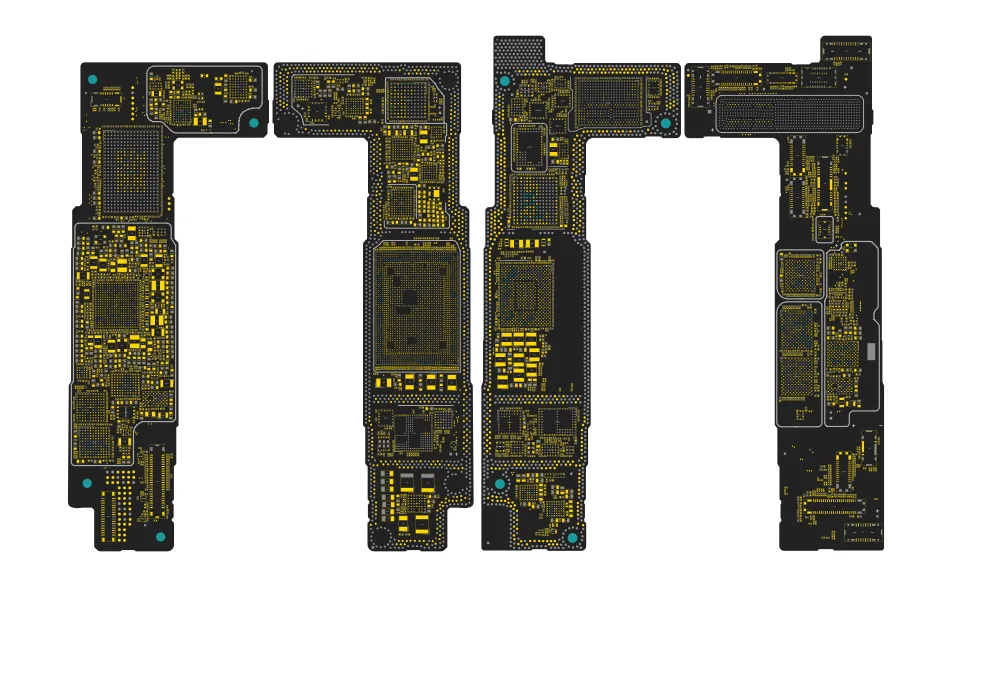
iPhone 15 & iPhone 15 Plus Schematics and Bitmap Boardview Added – Complete Motherboard Repair Guide
The iPhone 15 and iPhone 15 Plus Schematics & Bitmap Boardview are now available for mobile repair technicians and electronics engineers. This update provides detailed access to the motherboard circuit diagrams, PCB layouts, and component placement for both devices, helping technicians diagnose hardware faults faster and more accurately.
With the addition of schematics diagrams and high-resolution bitmap boardview, technicians can trace circuits, identify components, and perform advanced iPhone motherboard-level repairs.
iPhone 15 & iPhone 15 Plus Schematic Diagram
The schematic diagrams for iPhone 15 and iPhone 15 Plus provide a detailed electronic circuit representation of the motherboard. These diagrams illustrate how processors, power management ICs, capacitors, resistors, connectors, and signal lines are interconnected.
Using the schematics, technicians can:
Trace power rails and voltage lines
Diagnose motherboard short circuits
Identify faulty or missing components
Understand signal communication between ICs
Perform advanced PCB troubleshooting
Schematics are essential tools for professional smartphone motherboard repair technicians.
iPhone 15 & 15 Plus Bitmap Boardview
The bitmap boardview provides a visual layout of the motherboard showing the exact physical placement of components on the PCB.
Key benefits include:
High-resolution PCB layout view
Easy IC and component identification
Faster troubleshooting and diagnostics
Netname and partname tracing
Accurate component placement reference
This allows technicians to quickly locate components during iPhone 15 and iPhone 15 Plus motherboard repairs.
Hardware Platform Overview
The iPhone 15 and iPhone 15 Plus are powered by the advanced Apple A16 Bionic processor and use a high-density multilayer PCB motherboard design.
Because of this complex architecture, technicians rely on schematics and boardview files to diagnose hardware issues and perform board-level repairs.
Why Schematics & Boardview Are Important
Modern smartphones contain thousands of micro-components arranged on multilayer PCBs. Without proper repair documentation, diagnosing motherboard faults becomes extremely difficult.
Using iPhone 15 / 15 Plus schematics and boardview, technicians can repair:
No power issues
Charging faults
Short circuits on motherboard
Display and touch problems
Camera and sensor faults
Signal and connectivity issues
These tools significantly improve repair accuracy and troubleshooting efficiency.
iPhone 15 & 15 Plus Motherboard Repair Support
With the addition of iPhone 15 and 15 Plus Schematics & Bitmap, technicians can perform advanced diagnostics including:
Power rail analysis
Signal tracing between ICs
Component and IC identification
Boardview and schematic cross-reference
PCB-level troubleshooting
This allows technicians to perform professional-level iPhone motherboard repairs more efficiently.
iPhone 15 Schematics
iPhone 15 Plus Schematics
iPhone 15 Boardview
iPhone 15 Plus Boardview
iPhone 15 Bitmap
iPhone 15 Plus Bitmap
iPhone 15 PCB Layout
iPhone 15 Plus PCB Layout
iPhone Motherboard Diagram
Apple iPhone Repair
Smartphone PCB Repair
Mobile Technician Tools
iPhone 15 & iPhone 15 Plus FAQ
Does W2R Schematics have the iPhone 15 & iPhone 15 Plus schematic diagram?
Yes. W2R Schematics has the iPhone 15 & iPhone 15 Plus schematic diagram, boardview, bitmap and PCB layout. The files open in the W2R Schematics desktop app for Windows 10 and 11.
Can I find a component on the iPhone 15 & iPhone 15 Plus boardview?
Yes. In the W2R board viewer, right-click and choose Find Component or Find Net to highlight a part or signal on the iPhone 15 & iPhone 15 Plus board. When the schematic is linked to the board, double-clicking a net in the schematic highlights every pad on that net. Using the schematic and board together
Is the iPhone 15 & iPhone 15 Plus schematic free?
This page is free to read. The iPhone 15 & iPhone 15 Plus files open in the W2R Schematics app with a subscription, and new accounts get a 7-day free trial. See plans and pricing
Also read: iPhone 15 Pro & iPhone 15 Pro Max Schematics and Bitmap Boardview – Complete PCB Repair Diagram
For similar diagnostics, refer to iPhone 15ProMax(USA) Schematics & Boardview.