iPad 10th Gen Boardview Added (A2696 A2757 A2777 A3162) – Charging, Display, Audio Circuit & Power Data
iPad 10th Gen Boardview added for models A2696, A2757, A2777, and A3162. Includes charging circuit data, display circuit data, audio circuit information, and power IN/OUT voltage details for motherboard repair technicians
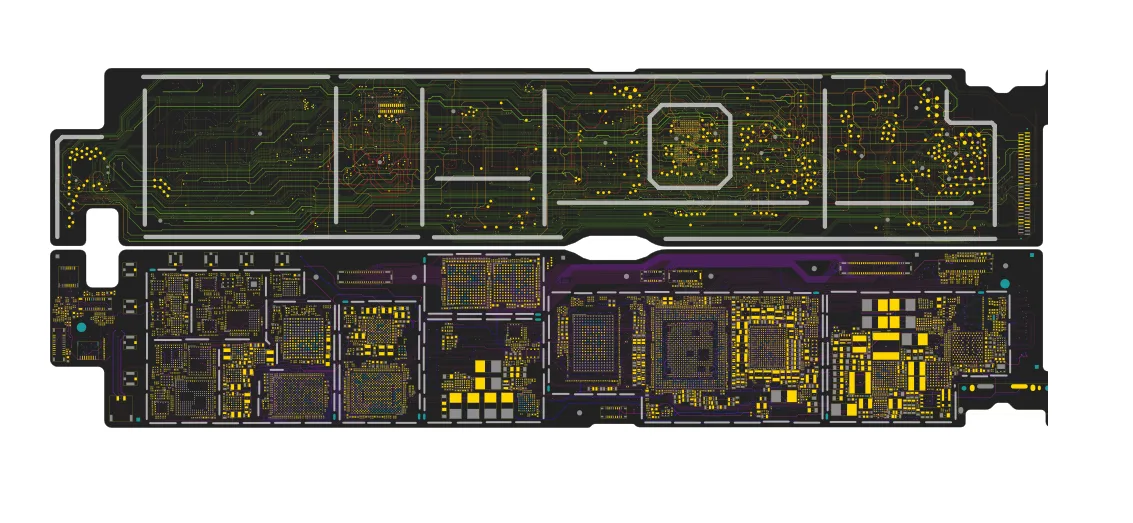
iPad 10th Gen Boardview Added (A2696 / A2757 / A2777 / A3162) – Complete PCB Repair Guide
The Boardview for the 10th-generation iPad is now available for repair technicians. This update includes detailed PCB component mapping, circuit data, and voltage information, making motherboard diagnostics faster and more accurate.
The boardview supports the following models:
A2696
A2757
A2777
A3162
These files provide technicians with the ability to identify components, trace power lines, and analyze motherboard circuits during advanced repair procedures.
iPad 10th Gen Boardview
The boardview file provides a detailed visual layout of the motherboard. It shows the exact position of components on the PCB, allowing technicians to quickly locate ICs, capacitors, resistors, and connectors.
Benefits of the boardview include:
Accurate PCB component placement
Faster troubleshooting for hardware faults
Easy identification of missing or damaged components
Netname and partname tracing support
Professional motherboard repair workflow
This makes iPad motherboard repair significantly easier and more efficient.
Charging Circuit Data Added
The update now includes detailed charging circuit information, helping technicians analyze the complete power charging path.
With this data technicians can:
Trace the USB-C charging line
Identify charging IC connections
Diagnose charging failures
Check voltage flow across the charging circuit
This feature is especially helpful when fixing iPad not charging or USB detection issues.
Display Circuit Data Added
The display circuit information has also been included, enabling technicians to analyze the entire display power and signal path.
Technicians can now:
Trace display power rails
Diagnose no display issues
Analyze backlight circuits
Identify display connector signals
This improves troubleshooting for screen, backlight, and display signal faults.
Audio Circuit Data Added
The update also includes audio circuit analysis, allowing technicians to inspect the sound processing path on the motherboard.
This helps with diagnosing:
No sound issues
Microphone problems
Speaker faults
Audio IC related failures
Power IN & OUT Voltage Information Added
Another major improvement is the addition of Power IN and OUT voltage data for important motherboard circuits.
Technicians can now:
Check voltage input and output values
Analyze power rails quickly
Identify power line failures
Troubleshoot motherboard power issues more accurately
This feature is extremely helpful for advanced PCB-level diagnostics.
Device Hardware Overview
The iPad (10th generation) uses the powerful Apple A14 Bionic processor and features a compact multilayer motherboard design, which requires professional boardview and circuit analysis tools for accurate repairs.
iPad 10th Gen Boardview
iPad A2696 Boardview
iPad A2757 Boardview
iPad A2777 Boardview
iPad A3162 Boardview
iPad 10th Gen PCB Layout
iPad 10th Gen Motherboard Diagram
iPad Charging Circuit Diagram
iPad Display Circuit Repair
iPad Audio Circuit Diagram
Apple iPad Schematics
Tablet PCB Repair
Mobile Technician Tools
iPad 10th Gen FAQ
Does W2R Schematics have the iPad 10th Gen schematic diagram?
Yes. W2R Schematics has the iPad 10th Gen schematic diagram, boardview and PCB layout. The files open in the W2R Schematics desktop app for Windows 10 and 11.
Can I find a component on the iPad 10th Gen boardview?
Yes. In the W2R board viewer, right-click and choose Find Component or Find Net to highlight a part or signal on the iPad 10th Gen board. When the schematic is linked to the board, double-clicking a net in the schematic highlights every pad on that net. Using the schematic and board together
Is the iPad 10th Gen schematic free?
This page is free to read. The iPad 10th Gen files open in the W2R Schematics app with a subscription, and new accounts get a 7-day free trial. See plans and pricing
Also read: iPad 2025 (11th Gen) – A3354 Schematics & Boardview
For similar diagnostics, refer to Ipad Air 6 13 Schematics & Boardview.